


CAT | Palm Pre Plus
16
Verizon drops the moms, advertises webOS as the awesomeness that it is
No comments · Posted by admin in Palm Pre Plus
Forget moms, let’s talk software! With Valentine’s Day in the past, Verizon has now turned their attention and considerable marketing muscle to advertising the Palm Pre Plus and Pixi Plus they way they’re meant to be advertised: as feature-packed smartphones. In 30 seconds time Big Red manages to cover more than Palm managed in their entire series of launch commercials.
Source: Pre Central
![Reblog this post [with Zemanta]](http://img.zemanta.com/reblog_e.png?x-id=f7b0f3d8-8eb6-40cd-97d7-72535b929d87)
Advertising · Palm Pre · Palm Pre Plus · pixi · Smartphone · valentines day · Verizon · Verizon Communications
14
Palm Pre Plus & Pixi Plus Hands On
No comments · Posted by admin in Palm Pixi Plus, Palm Pre Plus
TB goes hands on with two of Verizon’s newest smartphones, the Palm Pre Plus & Pixi Plus. Both phones run on Palm’s Web OS 1.3.5, and feature capacitive touchscreens, and full QWERTY keyboards.
Source: 7touch group
![Reblog this post [with Zemanta]](http://img.zemanta.com/reblog_e.png?x-id=da7926af-88d1-4822-a3f5-18d7b89df20c)
Handhelds · Palm OS · Palm Pre Plus & Pixi Plus · PalmPre · pixi · Smartphone · Verizon · WebOS
5
Palm Palm Pre Plus vs. Palm Pixi Plus
No comments · Posted by admin in Palm Pixi Plus, Palm Pre Plus
Wired has a comparison between the Palm Palm Pre Plus and the Palm Pixi Plus, here is the highlight:
Pixi Plus:
WIRED So small it’ll fit nearly any pocket. New Wi-Fi and hotspot features add bite. Comes with Touchstone-ready and rugged skins. Pinch-zoomers rejoice: It sports multitouch.
TIRED So small it’ll cramp nearly any thumb. Mobile hotspot feature eats up waaaay too much juice. 2-megapixel camera is no longer acceptable. Switching skins is harder than peeling grapes.
Pre Plus:
 WIRED Small, but thoughtful design tweaks make the Pre even prettier. With Verizon, the Pre Plus finally gets the network (and audience) it deserves. Big boosts in RAM and storage makes elegant webOS shine even more. Still an insane multitasking machine.
TIRED Anemic battery life — especially when partaking in app orgies. Touchstone base not included with purchase. Touchscreen still not as responsive as other smartphones. Cramped keys and sub-par predictive text make typing a chore. Where are the apps? Palm’s App Catalog is still puny compared to Apple and Google’s.
![Reblog this post [with Zemanta]](http://img.zemanta.com/reblog_e.png?x-id=e213258c-ce03-402d-a3e2-610a0f0f403b)
Add new tag · Apple · Google · Palm · Palm App Catalog · PalmPre · Smartphone · WebOS · Wi-Fi
4
Analyst confident about Palm-Verizon partnership
No comments · Posted by admin in Palm Pre Plus, Verizon Wireless
Palm got another shot in the arm after an analyst said he thinks Palm can ship 600,000 webOS-based devices through Verizon Wireless in the current quarter. He also said it is possible that Palm will eclipse Research in Motion’s BlackBerry platform and Google’s Android OS in developer support by the end of this year.
The analyst, Jonathan Goldberg of Deutsche Bank, raised his price target on Palm’s stock, which was recently trading up 5.4 percent to $11.11 per share. Calling webOS a “scarce resource,” Goldberg said in a research note that Palm’s App Catalog already has 1,300 apps, more than in app stores by Nokia and Microsoft. “We think Palm has created a valuable asset in its webOS. If they can grow their installed base of users and keep the carrier momentum going, this value should become more apparent,” he said.
Read more: fiercewireless
![Reblog this post [with Zemanta]](http://img.zemanta.com/reblog_e.png?x-id=b19cc72b-7a39-4df2-a893-7fae4adff709)
Add new tag · android · Google · Microsoft · Palm · Palm App Catalog · Research in Motion · Verizon Wireless · WebOS
Verizon recently added the Palm Pre Plus to its smartphone roster and PC Magazine has some tips to help you get the most out of the phone:
1. Get Used to Universal Search. Just start typing the first letters of persons name and the phone will call up that person’s contact info. If you don’t have that info your phone, Google, Wikipedia, and Twitter searches are automatically launched. You can also use keywords like “pic,” “store,” and “ToDo,” which will automatically pull up individual applications.
2. Don’t Count on iTunes Synching. When the Pre launched, all you had to do was connect it to your PC, and it would synch your music and podcast libraries in iTunes, just like an iPod. Apple was not amused and disabled the feature in an iTunes update. Then Palm re-enabled it in an update of their own. And then…well, you get the idea. I just tried it with iTunes 9.0.0.7, and it worked fine. After I updated iTunes to 9.3, the sync broke again. This may continue for a while. You can always put the phone into USB mode and drag and drop files, but I recommend using a utility like DoubleTwist (free at www.doubletwist.com) to avoid the mess altogether.
3. Turn on Advanced Gestures. I used my Pre for months before Bill Shrink’s CEO Peter Pham told me about this tip. Just go to Screen, Lock, and Turn on Advanced Gestures. This will let you flip through applications in full-screen mode without using the Card View menu. It saves you some swipes.
4. Buy an Extra Battery. Sad to say it, but the Palm Pre’s battery life kind of sucks. I charge it every day, usually both at home and in the office. If you can swing it, you can pay $50 for the Touchstone inductive charge, which is cool as hell, but $50 is a lot to pay for an AC adapter. On a journalist’s salary, $20 for an extra battery is a better bet. You can get them on Amazon.
5. Delete apps with two clicks. For months, I thought the only way to delete apps was to go into Device Info and scroll through a long list. Total waste of time. All you have to do is hold the orange key and tap an application icon. You will get a pop-up window that tells you how much space the app takes and lets you delete it with one click. This is particularly important for Sprint users, since our devices have only half the memory of the Plus models, but it’s good advice all the same.
![Reblog this post [with Zemanta]](http://img.zemanta.com/reblog_e.png?x-id=f345ec39-d6be-4dcd-8000-4567147eb56f)
Add new tag · Apple · Google · iTunes · ITunes Store · Palm Pre · PC Magazine · Personal computer · Wikipedia
2
Verizon Finally Advertising Pre Plus …to your Mom
No comments · Posted by admin in Palm Pre Plus, Verizon Wireless
Verizon is finally advertising the Palm Pre Plus.
Source: Pre Central
![Reblog this post [with Zemanta]](http://img.zemanta.com/reblog_e.png?x-id=e032d30e-6ebe-40f3-b441-bfb432fbacb9)
Add new tag · Handhelds · Palm OS · Palm Pre · Palm Pre Plus · pixi · Unix and Linux · VerizonWireless · WebOS
Unboxing of the Palm Pre Plus for Verizon
25
Verizon Palm Pre Plus and Pixi Plus on sale now
1 Comment · Posted by admin in Palm Pixi Plus, Palm Pre Plus, Verizon Wireless
We have waited for this words since we launched the site:
The Palm Pre Plus and Palm Pixi Plus have arrived for sale at Verizon Wireless’ online store, and as expected they run to $149.99 for the Pre Plus and $99.99 for the Pixi Plus thanks to a $100 online discount.
Enjoy!
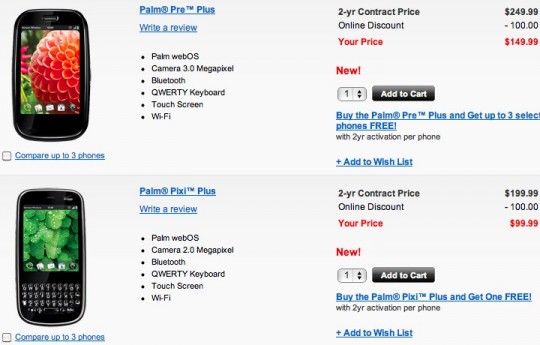
Source: Slash Gear.
![Reblog this post [with Zemanta]](http://img.zemanta.com/reblog_e.png?x-id=d45d88a2-ce13-4c1a-b124-49ed7834d556)
Add new tag · PalmPre · pixi · PixiPlus · Smartphone · Sprint · VerizonWireless · WebOS · Wi-Fi
22
Verizon to offer BOGO on Palm Pre Plus and Palm Pixi Plus
No comments · Posted by admin in Palm Pre Plus, Verizon Wireless

- Image via Wikipedia

Verizon will be having a buy one get one free promotion on the Palm Pre Plus and the Palm Pixi Plus, a deal that will run from launch day through February 14th, Valentines Day.
Source: BGR.
![Reblog this post [with Zemanta]](http://img.zemanta.com/reblog_e.png?x-id=645495cc-c19c-44d3-80b1-702852e6f16e)
Add new tag · buy one get one free · Handhelds · Palm OS · Palm Pre Plus · PalmPixiPlus · PalmPre · pixi · Verizon
22
Verizon: Palm Pre Plus, Pixi Plus will cost $149, $99 with contracts
No comments · Posted by admin in Palm Pre Plus, Verizon Wireless
Yep, the $149 and $99 two-year contract prices for the Verizon Wireless versions of Palm’s Pre and Pixi touchscreen phones are the same as they are on Sprint. That said, the Pre Plus and Pixi Plus each come with support for a killer new feature: the ability to turn either handset into a wireless hotspot. Hands-on impressions ahead.
Set for release January 25—next Monday—on Verizon, the Pre Plus and Pixi Plus (announced earlier this month at CES in Las Vegas) are virtually identical to the original Pre and Pixi on Sprint, right down to the $100 mail-in rebates you’ll need to send (via snail-mail, of course) to get the $149 and $99 two-year contract prices.
There are a few key differences, though, ranging from the cosmetic (no more physical trackballs, keys that have a little more “click” than they did before) to the internal (the Pre Plus comes with 16GB of built-in flash storage, versus just 8GB for Sprint’s Pre).
One of the coolest features for the new phones, however, is actually an app that’ll only be available for Verizon Wireless subscribers (at least initially, anyway): Palm Mobile Hotspot, which turns your Pre Plus or Pixi Plus into a portable Wi-Fi access point, à la Novatel’s credit card-sized MiFi.
Read the full story on Yahoo Tech
![Reblog this post [with Zemanta]](http://img.zemanta.com/reblog_e.png?x-id=8921a1fd-b387-412d-a22a-3234fc373c84)
Add new tag · Hotspot · Novatel · Novatel Wireless · Pixi Plus · Pre Plus · Sprint · Verizon Wireless · Wi-Fi
